Your First Two Weeks
The app hands you a dozen tools and trusts you to pick — which is lovely, unless you're brand new and have no idea what order they go in. Here's the order.
A quick promise before the plan: none of this is homework. There's no streak to protect and nothing resets if life gets in the way — the plan is a suggestion, not a contract. Ten minutes a day is plenty. Five counts.
One thing worth saying up front, because it changes what you practice first: bass is not a small guitar. You'll spend most of your playing life on one note at a time, in the bottom half of the neck, holding a room together. So the first fortnight isn't about chords. It's about your hands, a few notes you can find without looking, and one groove you can hold.
Rule zero: tune, every time
Every session starts the same way: open the Tuner tab and play each string open. The tuner listens and works out which string you're on by itself — no tapping through menus — and the meter goes solid green the moment you land. Thirty seconds, four strings, done.
This matters more than any other habit on this page. An out-of-tune bass makes everything sound wrong, including the things you're playing correctly — and as a beginner you can't yet tell the difference between "I fretted that badly" and "this string is flat." Tuning first removes the doubt. If the room is noisy, or an amp hum keeps stealing the tuner's attention, tap a string letter to lock it onto that one note instead of guessing.
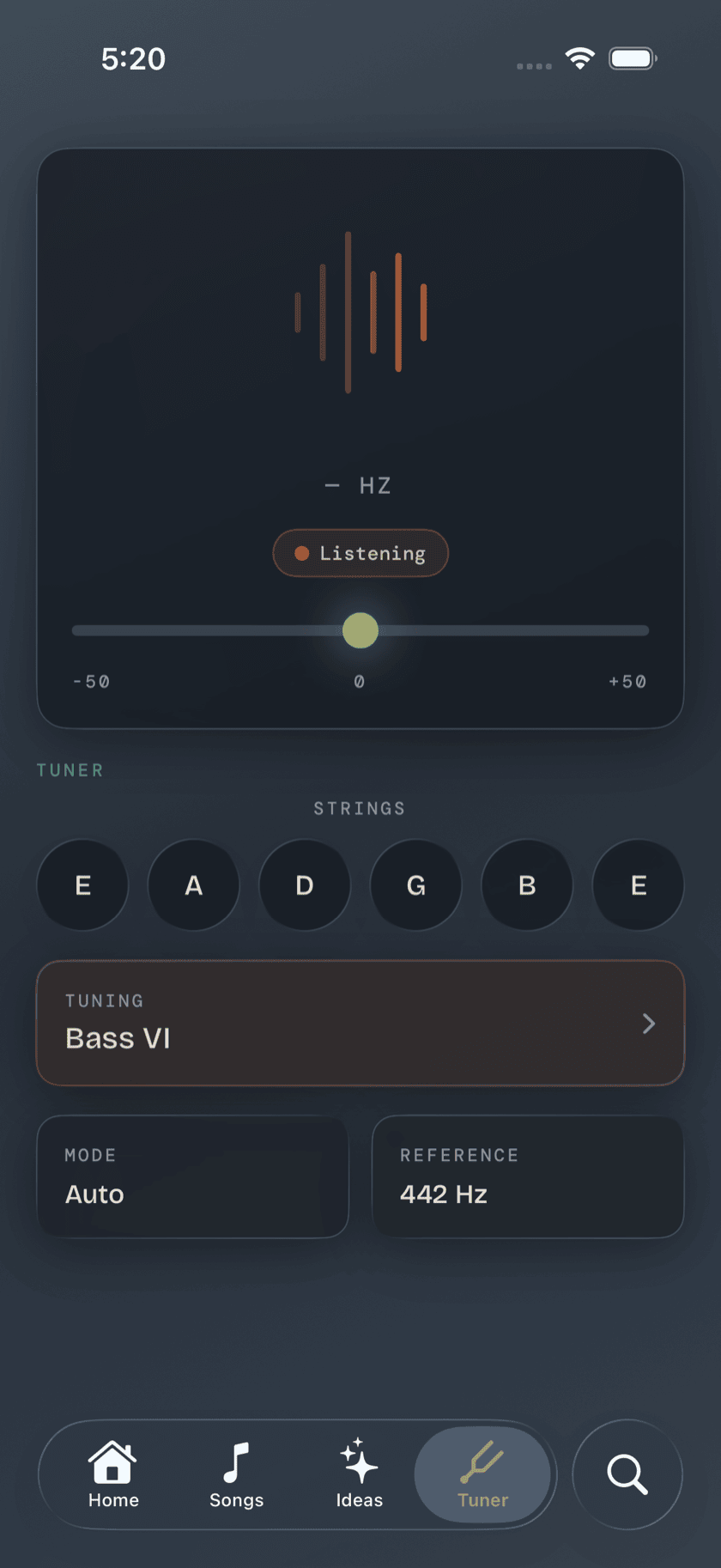
Worth knowing: a low E sits around 41 Hz, and low notes take longer to identify than high ones — that's physics, not a slow app. Tuner's detection is built for bass registers specifically, so the low string settles about as fast as the G. Give it a clean, sustained note rather than a short pluck and it'll lock on quicker still. The Tuner page covers presets, custom tunings, and reference pitch; the journal's tuning guide covers what E A D G actually means.
Days 1–3: your hands, and five notes
Two things happen this week, and they're both unglamorous. The first is teaching your fretting hand to reach.
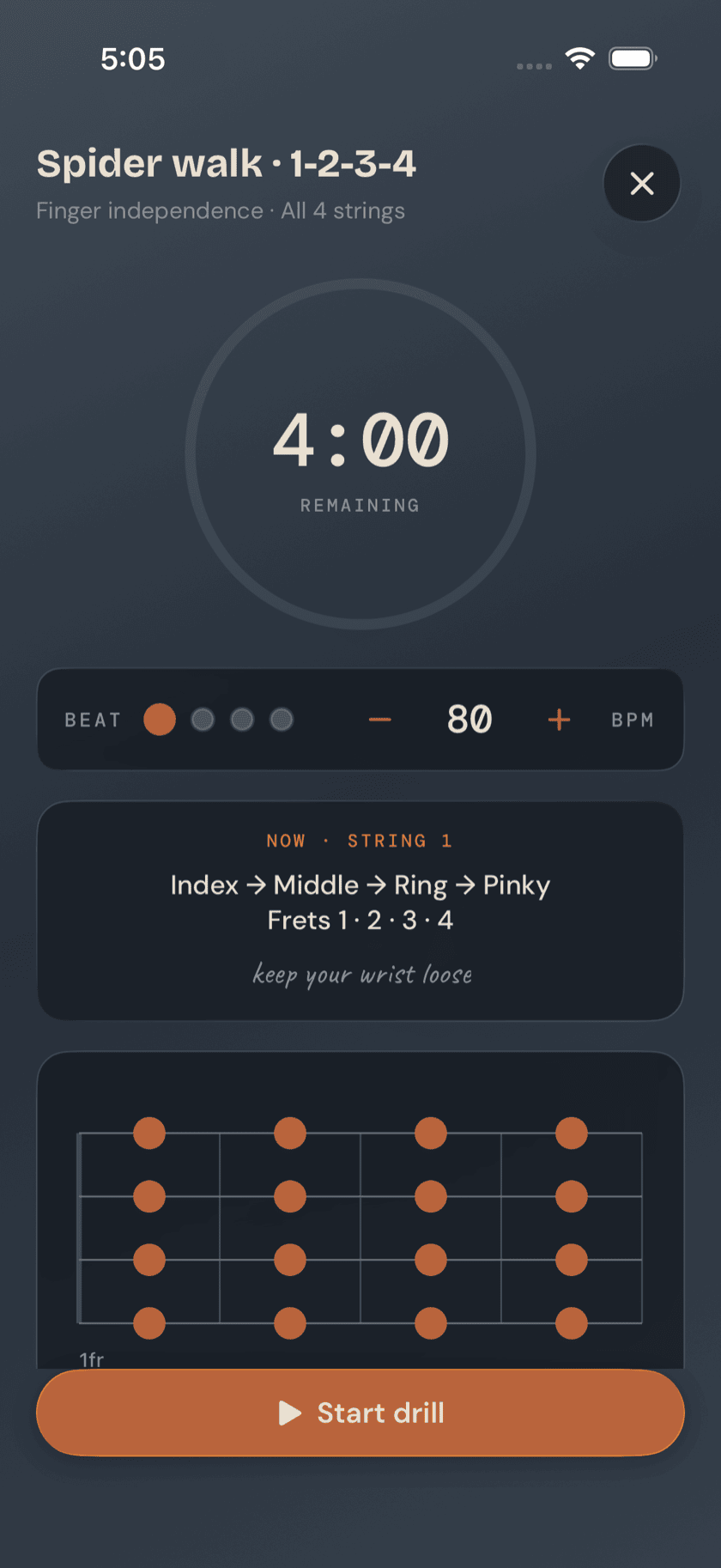
Bass frets sit a good deal wider apart than a guitar's, and a hand that hasn't done it before will cramp, cheat, and collapse. Spider Walk, in the Drills tile of the Practice Hub, is the fix: four minutes, one finger per fret, index-middle-ring-pinky walking 1-2-3-4 across all four strings, with a finger-ladder diagram showing exactly which finger lands where. Do it before you play anything else. Cold fingers loosen up faster on this than on a bassline you're also trying to learn.
The second thing is knowing where you are. A bass part is mostly root notes, so the single most useful thing you can own in week one is the bottom two strings: every note on E and A, frets 0 to 5. That's a dozen notes, and it covers a startling share of everything you'll ever be asked to play.
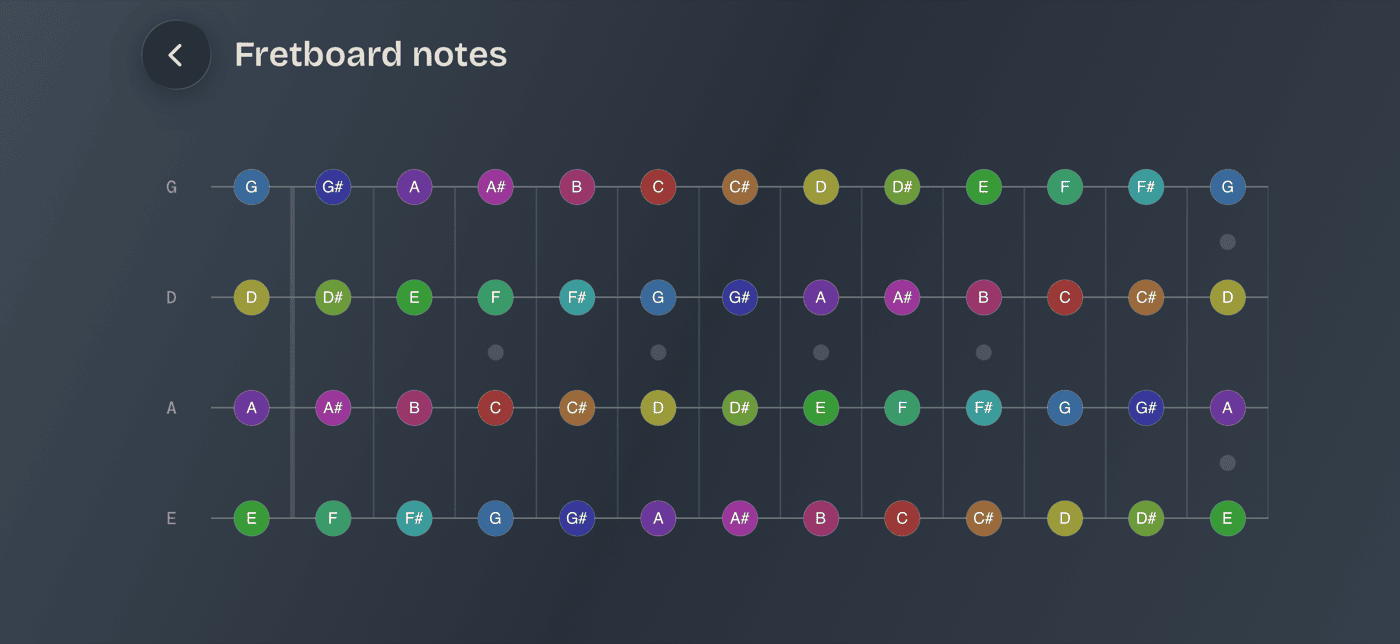
Open the Fretboard card in the Practice Hub and start with the Cheat Sheet — nothing to answer, nothing timed, just a map of every note from fret 0 to 12, color-coded by pitch class so octaves and repeats jump out. Turn your phone sideways for the full stretch. Look at it, find the E string's F, G, and A, and say them out loud.
Then close it and open the Fretboard Trainer to see if any of it stuck. Filter it down to one string and naturals only — that's the beginner setting, and there's no shame in it — and run a round of ten. It quizzes in both directions: find this note puts a name up and asks you to tap the fret, name this note lights a fret and asks for the letter. Being good at one and hopeless at the other is completely normal, and mixing both is the point.
Days 4–7: one groove
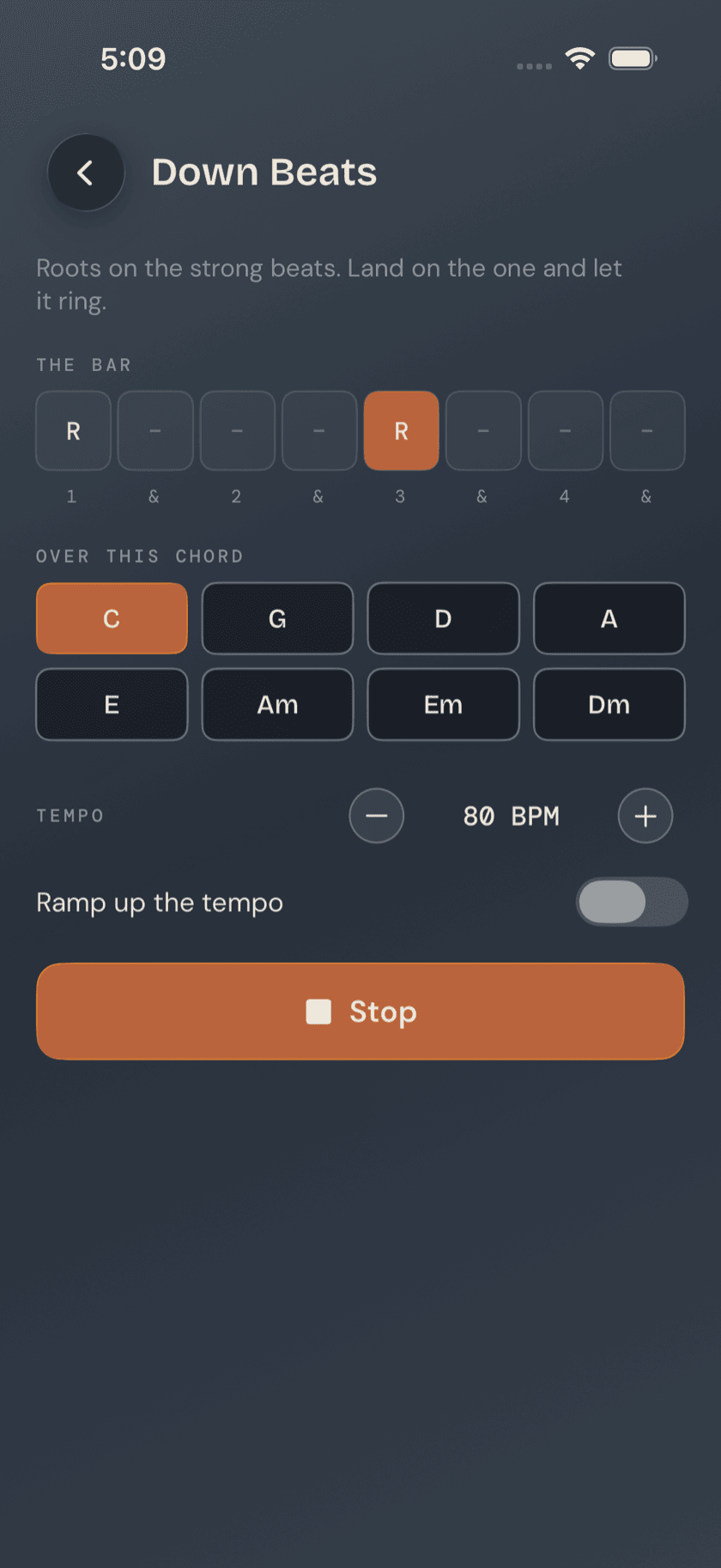
Now you get to sound like a bass player. Open Grooves from the Practice Hub. It's the closest thing bass has to a strumming pattern: one bar, looped, drilled until your hand plays it without you.
Take a root-fifth pattern — you'll see it written as something like R · 5 · R · 5. That's not tab. It's scale-degree shorthand: R for the root, 5 for the fifth, 8 for the octave, a dot or a rest where you lay out. Which is what makes these patterns worth drilling — they're built from chord tones, not frets, so the same one-bar shape drops in under any chord you ever meet. Learn it once, use it forever.
Tap it and the player gives you a count-in, then loops. A step highlight moves across the symbol row in time, so you always know which note you're on without counting bars in your head. Start slower than feels dignified. When it's clean, flip on speed up gradually and let the tempo climb on its own.
Once root-fifth is dull, take an octave jump — R · 8 · R · rest, the bounce underneath most disco and a fair amount of funk. It'll feel like a stretch for a day or two, which is exactly what Spider Walk was for. The Grooves page covers the library and the player in full.
By the end of the first week you have a hand that reaches, a dozen notes you can find, and one groove you can hold. That is, genuinely, a bass player. So go and be one in a song.
Week two: your first song
This is the part the whole first week was for. On the Songs tab, tap +, then Songs you can play. Tap the chords you recognize and the app splits its catalog into two piles: songs whose every chord you already have, flagged ready to play, and songs sitting one or two chords past you.
You don't need to play chords for this to work — on bass, a chord name is mostly an instruction about which note to sit on. If you know where E, A, D and G live, you know more chords than you think.
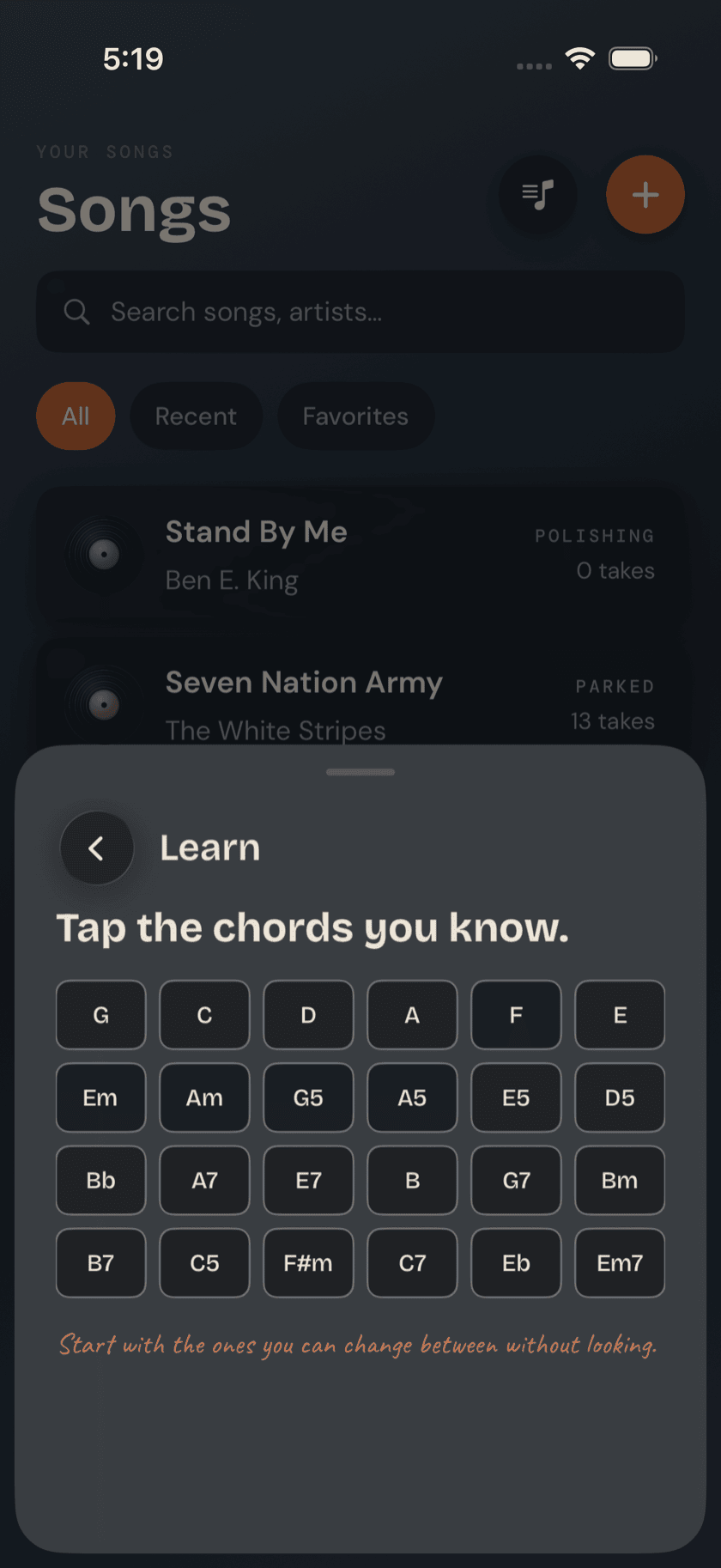
Pick something from the ready pile — ideally something you'd hum anyway; you'll practice a song you love ten times more than a song you're assigned. Play the roots first, one note per chord, nothing else. When that's locked in and the changes land where they should, put your root-fifth pattern under it. That's an arrangement.
The song page carries a chord grid across the top, tappable for a diagram and a listen, plus a transpose stepper and a Simplify chords toggle that turns anything exotic into the plain triad underneath it. If you've found a proper four-line bass tab online, paste it in — or point the camera at a printed one — and the app works out what it's looking at and lays it out to read from, with a teleprompter mode that scrolls hands-free while you play. The journal's tab guide covers how to read one.
And when you tap Practice from a song's page, one of the tools waiting there is a groove drill built from that song's own chords — the pattern you spent days 4 to 7 on, pointed straight at the thing you're learning.
Worth knowing: there's no penalty hiding anywhere in this. Skip a day, skip four — the app keeps no streak, sends no guilt, resets nothing. Two weeks of ten-minute sessions beats one heroic Saturday, but the app will never say so out loud.
What to ignore for now
The fastest way to stall in week one is opening everything. All of this is good, and none of it is for right now:
- The Chord Library, Chord Finder, and Chord Coach — genuinely useful later, when you want to know why a bassline picks the notes it does. In week one, a chord is just a name telling you which root to play.
- Scales & the full-neck views — one scale learned properly beats six half-learned, and neither belongs in your first fortnight. The neck map can stay a cheat sheet a while longer.
- Loops & the Loop Trainer — for drilling a tricky passage in a specific song. You need a repertoire before you need surgery on it.
- Walking basslines — the thing everyone wants to skip ahead to. It's root-fifth with somewhere to go; you're already building the foundation for it.
- Progressions, Jam, Metronome — the band can wait a week. The Grooves player's count-in and loop keep time for you until then.
Everything on that list will still be there in week three. That's the whole design.
When two weeks are up
If you've tuned, stretched, found your notes, held a groove, and played something — you're no longer a day-one beginner, and the rest of the app starts making sense on its own. Three natural next steps, in rough order:
1. Make the plan a routine. The hub's Routines tool chains what you've been doing by hand — tune, warm up, groove, song — into one guided, timed session you start with a single tap.
2. Meet the band. Progressions loops a chord sequence with drums and keys around you, which is the first time your root notes will sound like they're holding something up. That feeling is the job.
3. Just jam. When a progression feels good, Jam gives you the full band, your key, your tempo, and a record button.
And for the philosophy of what a single good session looks like — short, focused, ending on something fun — the journal's practice routine article is the companion piece to this page: this one told you which tools; that one explains how it stays a habit.
A calmer way to sit with your bass.
Learn songs, capture ideas, jam over backing tracks, and tune up — free, local-first, on iOS, iPadOS & macOS.
Explore Bass Buddha →